
Achieving 60 frames per second (fps) in web animation is often treated as the holy grail of frontend development. When you are building high-end interfaces—perhaps utilizing tools like GSAP or crafting intricate Bento Box layouts—you expect your animations to be buttery smooth.
But smooth animation is not just about writing clean CSS or efficient JavaScript. It is a deep, mechanical handshake between the browser, the Operating System (OS), and the physical hardware of the monitor. At the absolute center of this handshake are two concepts: V-Sync (a hardware and OS-level protocol) and requestAnimationFrame (the browser’s API hook into that protocol).
To truly master web animation, you must understand how these layers communicate. Here is a comprehensive, professional breakdown of how requestAnimationFrame and V-Sync work together to eliminate jank and create flawless digital experiences.
The Hardware Reality: Monitors and V-Sync
To understand the software, we must first look at the hardware. Your computer monitor is not a static canvas; it is a strobe light. A standard monitor redraws the entire screen from top to bottom 60 times every second (a 60Hz refresh rate). This means you have exactly 16.67 milliseconds to calculate, render, and push a new frame to the screen.
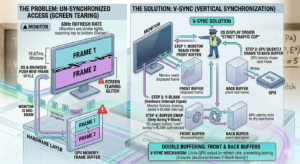
The Graphics Processing Unit (GPU) has a specific area of memory called the Frame Buffer, which holds the pixel data of the image currently being displayed.
The Problem: Screen Tearing
What happens if the OS and the browser calculate a new frame of your animation and push it to the Frame Buffer while the monitor is halfway through drawing the previous frame? The top half of the screen shows Frame 1, and the bottom half shows Frame 2. This visual glitch is called Screen Tearing.
The Solution: V-Sync (Vertical Synchronization)
V-Sync is a hardware feature managed by the OS display driver. It acts as a strict traffic cop. V-Sync locks the GPU’s frame output to the monitor’s refresh rate. It uses a system called Double Buffering:
-
The monitor reads from the Front Buffer (the currently displayed frame).
-
The GPU silently draws the next frame of your animation to the Back Buffer.
-
When the monitor finishes drawing the current frame, it sends a hardware interrupt signal to the OS called the V-Blank (Vertical Blanking Interval).
-
Only during this V-Blank split-second does the OS allow the Front and Back buffers to swap.
V-Sync ensures you never get screen tearing. But for this to work, your JavaScript must know exactly when that V-Blank signal is happening.
The Dark Ages of Animation: setInterval
Before modern APIs existed, developers animated the web using setTimeout or setInterval. You would tell the browser: “Move this div 1 pixel to the right every 16 milliseconds.”
JavaScript
// The old, flawed way
setInterval(() => {
    element.style.transform = `translateX(${position}px)`;
    position++;
}, 16);
Why this is mechanically flawed:
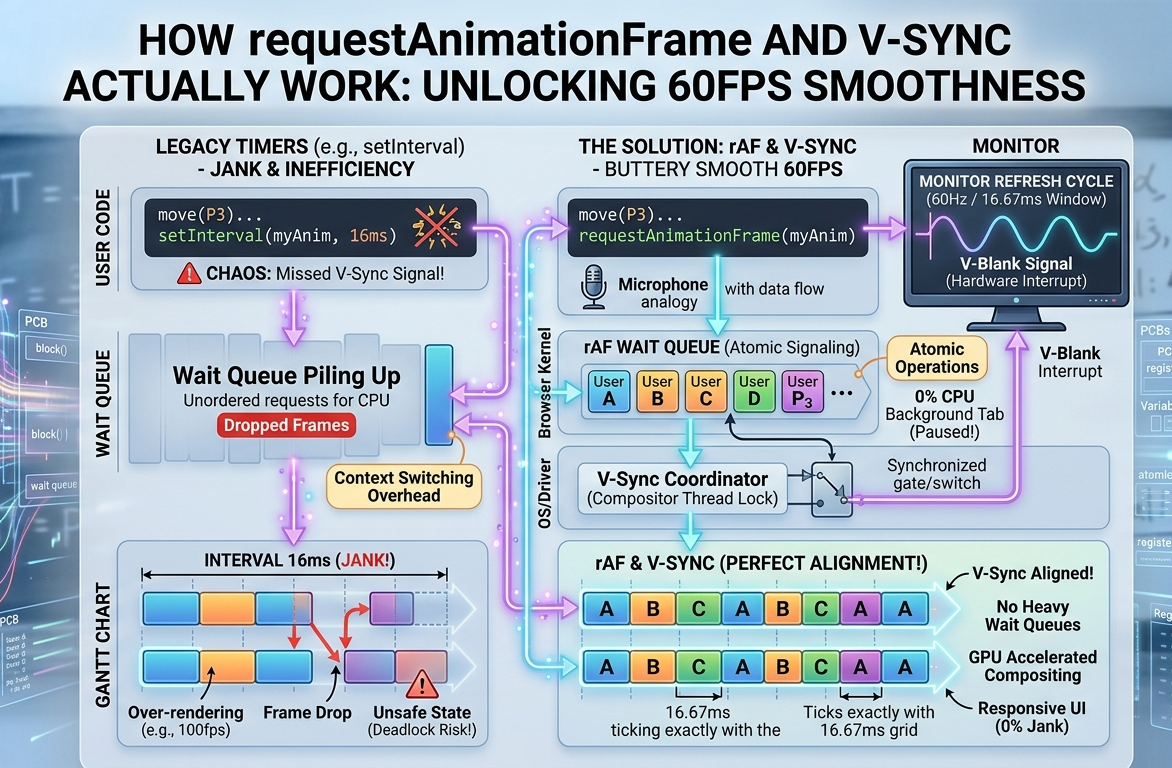
setInterval is entirely ignorant of the OS and the monitor. It simply dumps execution tasks onto the browser’s Main Thread event queue based on a blind timer.
-
Phase Mismatch: The timer might fire exactly halfway between the monitor’s V-Sync refresh cycles. By the time the browser calculates the layout and paints, it misses the V-Blank window. The frame is dropped, resulting in a visible stutter (jank).
-
Over-rendering: If you set the interval to 10ms, the browser is calculating 100 frames per second, but a 60Hz monitor can only display 60. You are forcing the CPU to do 40% more work for absolutely zero visual benefit, draining battery life and causing the fans to spin up.
-
Background Wasted Cycles: If the user switches to a different browser tab,
setIntervalkeeps firing ruthlessly in the background, consuming RAM and CPU cycles to animate a screen no one is looking at.
Our portfolio Makeuser
The Savior: requestAnimationFrame (rAF)
To bridge the gap between frontend code and OS-level hardware interrupts, browser vendors introduced window.requestAnimationFrame().
rAF is not a timer. It is a subscription service. When you call requestAnimationFrame(myAnimationFunction), you are telling the browser: “I have an animation update. Please run this function at the absolute most optimal moment right before you are about to paint the next frame to the screen.”
How rAF Achieves Mechanical Sympathy:
-
V-Sync Alignment: The browser listens for the OS’s V-Blank hardware interrupt. It aligns all rAF callbacks to execute precisely at the beginning of the frame lifecycle (Style $\rightarrow$ Layout $\rightarrow$ Paint $\rightarrow$ Composite). This guarantees your JavaScript updates are perfectly synchronized with the monitor’s refresh rate. If the user has a 144Hz gaming monitor, rAF automatically scales to run 144 times a second. If they have a 60Hz monitor, it runs at 60.
-
Frame Coalescing: If you have multiple distinct animations running on a page, rAF gathers all of their DOM updates and batches them into a single reflow/repaint cycle. This prevents the browser from doing redundant layout calculations, massively saving CPU overhead.
-
OS-Level Power Management: This is where rAF truly shines architecturally. If the user minimizes the browser or switches to another tab, the browser communicates with the OS scheduler. It recognizes the page is no longer visible and completely suspends
requestAnimationFramecalls. Your animation pauses natively, reducing CPU usage to 0% and saving battery life.
To truly understand the performance delta between a blind timer and a V-Sync aligned API, it helps to see it in motion under simulated CPU stress.
[Direct Text Answer]
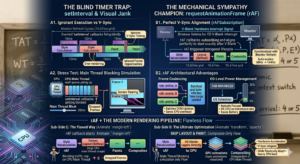
The interactive widget below visualizes the core difference between setInterval and requestAnimationFrame. It simulates a rendering pipeline under CPU stress. When you add “Main Thread Bloat,” you will see how setInterval drops frames and creates visual jank, while rAF attempts to natively align with the browser’s paint cycle.
[Explanation of Method]
We will visualize two identical animation tracks. You can select the scheduling algorithm (rAF vs. setInterval) and manually introduce synthetic main-thread blocking (simulating heavy JavaScript calculations). The visualizer tracks the simulated FPS and visually highlights missed V-Sync windows as “dropped frames.”
The Modern Rendering Pipeline: Why It Matters
Using requestAnimationFrame is just step one. To achieve truly flawless 60fps web animation, your rAF calls must work in harmony with the OS’s Compositor Thread.
When you change a CSS property via JavaScript inside a rAF loop, the browser goes through a pipeline:
-
Recalculate Style: What changed?
-
Layout (Reflow): Did the geometry change? (e.g., changing
width,margin,top). This is highly expensive and happens on the Main CPU Thread. -
Paint: Drawing the pixels.
-
Composite: Stacking the painted layers together.
If you animate margin-left inside requestAnimationFrame, you are forcing the OS to recalculate the geometry of the entire page every 16.67ms. Even with rAF, you will likely drop frames if your layout is complex.
The Ultimate Optimization: The secret of high-end animation libraries is that they use rAF to orchestrate properties that skip the Layout and Paint phases entirely. By exclusively animating transform (like translate3d, scale, rotate) and opacity, the browser promotes the element to its own layer.
The OS hands this layer directly to the GPU (Graphics Processing Unit). The GPU handles the Compositing phase entirely independently of the CPU’s Main Thread. This means even if your Main Thread is blocked by heavy data processing, your animations will continue to glide flawlessly because they are hardware-accelerated and V-Sync aligned at the OS level.
Summary: Key Takeaways in Point Form
As requested, here is the distillation of how requestAnimationFrame and V-Sync interact, broken down into critical professional points:
-
V-Sync is the Hardware Baseline: Vertical Synchronization (V-Sync) is an OS/Hardware protocol that locks frame generation to the monitor’s refresh rate (typically 60Hz, or 16.67ms per frame) to prevent screen tearing.
-
setIntervalis Blind: Legacy timers likesetTimeoutandsetIntervalexecute based on an arbitrary clock. They do not know when the monitor is refreshing, leading to phase mismatches, dropped frames, and visual stuttering (jank). -
requestAnimationFrameis a Subscription: rAF is an API that allows the browser to hook directly into the OS’s V-Blank interrupt signal. It guarantees that your JavaScript animation logic runs at the absolute most optimal millisecond before the screen paints. -
Automatic Refresh Rate Scaling: rAF dynamically adapts to the user’s hardware. It will run at 60fps on standard monitors and automatically scale up to 120fps or 144fps on high-refresh-rate gaming monitors without any code changes.
-
Intelligent Power Management: Unlike
setInterval, which blindly runs forever, the OS and browser pause rAF calls when a user switches tabs or minimizes the window. This saves battery, reduces heat, and frees up CPU cycles. -
Batching DOM Updates: rAF groups multiple animation calls into a single reflow/repaint cycle, drastically reducing the computational overhead on the CPU.
-
Mechanical Sympathy Requires GPU Acceleration: To get the most out of rAF, developers must animate composite-only properties (
transformandopacity). This shifts the heavy lifting from the CPU to the GPU, creating truly unblockable, 60fps experiences.
Understanding this architecture separates junior interface designers from senior frontend engineers. It is the underlying mechanical truth that powers the smoothest, most premium experiences on the modern web.